

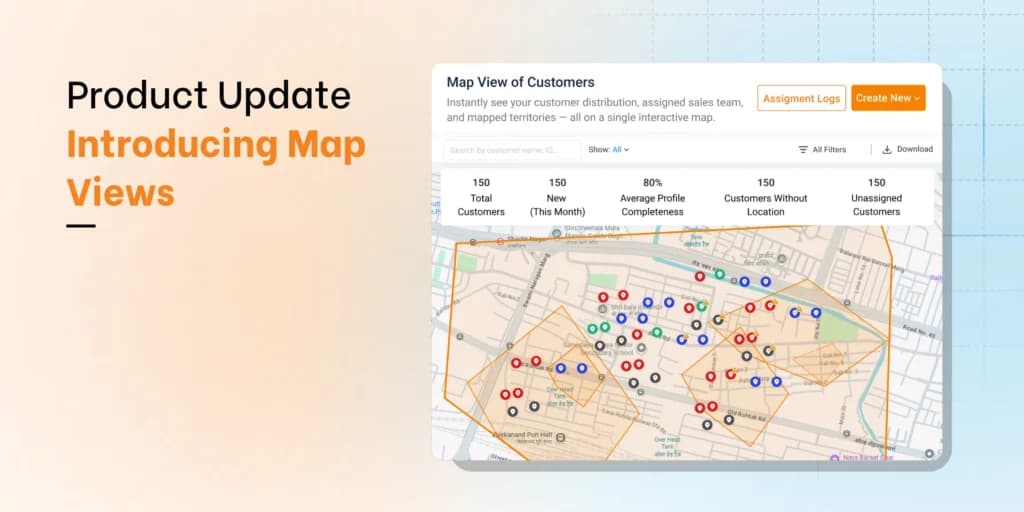
A sales territory mapping tool is software that puts your customers or outlets on a map and splits them into balanced territories, so each rep gets a fair workload and every account gets covered. The better tools go a step further: they turn each territory into the visit plan a rep follows every week, and they show what was sold where.
You probably need one if you rebuild territories in a spreadsheet each quarter, reps argue over who owns a store, or some outlets have not seen a rep in months while others get a visit every few days.
What a sales territory mapping tool does
The common features cover four jobs planners once did with a spreadsheet and a printed map.
- Puts every account on the map. It places each customer from its address or a GPS pin, so you can see clusters, gaps and accounts that two reps both think are theirs.
- Balances the territories. It splits accounts so each rep has a similar amount of work, judged by sales value, visit frequency or drive time.
- Assigns owners. Each territory gets a rep and a manager. At a retail brand it also gets the distributor that delivers to those outlets.
- Tests changes before they go live. You can try a new split, see how each rep's workload moves, and keep a record of what changed and when.
BeatRoute's Map Views show your customers or distributors on a map, with a heat map of outlet density and a filter for outlets nobody has been assigned.
Which kind of territory mapping tool fits your team
Tools sold as sales territory mapping software fall into five kinds.
| Kind of tool | What it does and who it suits | Where it falls short |
|---|---|---|
| Stand-alone mapping and territory design tools | You upload a spreadsheet of accounts and draw regions on postal codes, or balance them automatically. Suits planners who redraw a few hundred accounts once or twice a year. | The territory lives apart from visit plans and orders, so every change is copied across by hand. |
| CRM add-ons | They map the accounts already in your CRM and write the territory back to each record. Suits B2B teams whose deals live in the CRM. | Little for distributors or repeat outlet visits. |
| Route and visit apps for outside reps | They show a rep's accounts on a phone map and plan the day's stops. Suits small teams that sell direct. | Light on territory design, with no distributor or order layer. |
| Field sales and distribution platforms | They plan territories, beats and routes in the system that takes orders, records visits and manages distributors. Suits retail brands whose reps cover hundreds of small outlets on a repeating cycle. | More setup than a small direct sales team needs. |
| GIS tools | Geographic information systems with population layers and custom boundaries. Suits analysts running one-off market studies. | Slow for daily sales work, and they need specialist skills. |
One question settles most choices: does the territory need to drive a visit plan and an order book, or only a planning slide? If it only feeds the slide, the first two kinds will do. If reps run their day from it, look at the third and fourth.
Team size and channel narrow it further. A few reps selling direct to a few hundred accounts can work in a stand-alone tool or a CRM add-on. A large team covering thousands of grocers, kiosks and pharmacies is different: each outlet sits on a beat, the fixed list of outlets a rep visits on a set day, and a distributor delivers its stock. That is when a field sales platform earns its setup. For named products side by side, see our territory management software comparison.
How to map sales territories, step by step
- Name the problem. Decide what the new map must fix, such as outlets nobody visits or uneven targets.
- Geo-tag every account. Small shops often have vague addresses, so the most reliable pin is the one a rep captures while standing at the counter.
- Choose base boundaries. Build the territory map from areas everyone already uses, such as postal or ZIP codes, districts or city wards. A new outlet then falls into a territory the day it is added.
- Weight each account. Give each outlet a class, a visit frequency and its market potential. A large store visited weekly carries more work than a kiosk visited monthly, even when they sit side by side. That is why dense city territories end up small on the map and rural ones large: each should hold about the same hours of work.
- Balance on hours of work. Let the tool balance first, then adjust where a river or a highway makes its answer wrong. A crowded market street can take less time to cover than a handful of outlets spread along a highway.
- Assign reps and distributors. Check that each territory matches the area its distributor serves, or orders will land with the wrong partner.
- Turn territories into beats and routes. Split each territory into beats, then let route optimization put the stops in order.
Measure coverage by territory before you redraw
Judge each territory by customer connect: the share of its assigned outlets that reps actually reach. Sales by territory tells you what was sold. Customer connect tells you whether the map can be worked. Valvoline Cummins, a lubricants brand, found its reps were reaching only 25-30% of their assigned customers. With BeatRoute dashboards tracking customer connect, alongside routing and offline visit capture, that rose to 70%+. Read the Valvoline Cummins case study.
So before you hire for a thin territory, fix the map and the routes. Perfetti Van Melle Indonesia geo-tagged every one of its outlets, planned visits and routes from that map, and tripled store coverage in three years without expanding its field force. Read the Perfetti Van Melle Indonesia case study.
Inside a territory, the first sign of trouble is a beat nobody finishes, because a beat that cannot be completed teaches reps to skip outlets. A rep leaving or a distributor changing is the other trigger. Draw territories on geography and attach distributors to them, as BeatRoute's Workzones do, so a new distributor changes a link rather than the lines. Our guide to what a sales territory is shows how Workzones handle more than one distributor in the same area. After any change, filter the map for unassigned outlets to catch shops that fell between territories.
What to check when you compare territory mapping tools
Ask each vendor to load one region's real outlet file, then test these points.
| What to check | How to test it in a demo |
|---|---|
| Geocoding | Count how many of your outlets land in the wrong place. |
| Balancing rules | Balance by sales value, visit frequency and visit time, then change one weight and see what moves. Outlet counts alone mislead. |
| Drive time | Compare the tool's estimate for one real beat with what your rep drives. |
| Distributor boundaries | Draw a territory over one distributor's area and check that outlets, orders and stock follow it. |
| Mobile view for reps | Open the rep app in flight mode and complete a visit. |
| Orders and visits on the map | Ask to see last month's orders and missed visits by territory. |
Then pilot the winner in one region for at least two full beat cycles, and compare visits completed and outlets ordering with where you started.
When your territories run through distributors
BeatRoute suits brands whose reps sell to many retailers through distributors and want distributor management on the same platform. In BeatRoute, beat planning, route optimization and visit planning turn each territory into a day's work, and orders and visits sit on the same platform, so a weak territory shows up in this week's numbers.
If your reps run beats through distributors, request a demo and bring one region's outlet list.
Frequently asked questions
What is territory planning software?
It helps you decide which accounts belong together, how much work each territory holds and who owns it. Sales territory mapping software is the map-based form of it.
How is territory mapping different from route planning?
Territory mapping decides which rep and distributor own which accounts. Route planning decides the order a rep visits them on a given day. Get the territory right first: a good route cannot fix a territory that holds too much work.
Can I map sales territories in Excel or a free map tool?
For a few reps and a few hundred accounts, yes. It breaks down once territories must drive weekly beats and match distributor areas, because the map, the beat lists and the distributor lists drift apart with every change.
Can sales territory mapping software integrate with CRM systems?
Most import accounts from a CRM or ERP. The better ones keep syncing, so a new outlet created where you bill it appears on the map without a manual upload. In a demo, create a test outlet and time how long it takes to show up.
How is sales territory mapping software priced?
Usually as a subscription per user or module. BeatRoute is subscription software, priced per user and module on annual contracts, with no free trial.