

TL;DR: If your reps sell through distributors, choose sales territory mapping software that turns each territory into beats and books orders in the same system. Test it on one region's real outlet file, then judge each territory by how many of its outlets get a visit.
Sales territory mapping software is a tool that puts every duka, kiosk, provision store and stockist on one map and splits them into fair territories, each with a rep and distributor. Better tools go further: they turn each territory into the weekly beat a rep works, and show what sold where.
Picture a sales lead in Lagos. The same open-market lanes sit on two distributors' lists, and two reps both claim one provision store. Reports arrive late, so nobody sees that a whole district has gone a quarter without a visit, while shops near the depot see a rep every few days.
What a territory mapping tool does for your field team
It takes over four jobs that used to need a spreadsheet and a wall map in the regional office.
- Pins every outlet. Each shop sits on the map from a GPS pin, so you see clusters, empty streets and the stockist two reps both call theirs.
- Shares out the work. Each rep gets a similar week. You can measure it by sales value, by how often a shop needs a call, or by time on the road.
- Names who answers for it. Every territory has a rep, a supervisor and the distributor or wholesaler that delivers to those shops.
- Lets you try a change first. Move outlets on screen, see whose workload shifts, and keep a log of what changed and when.
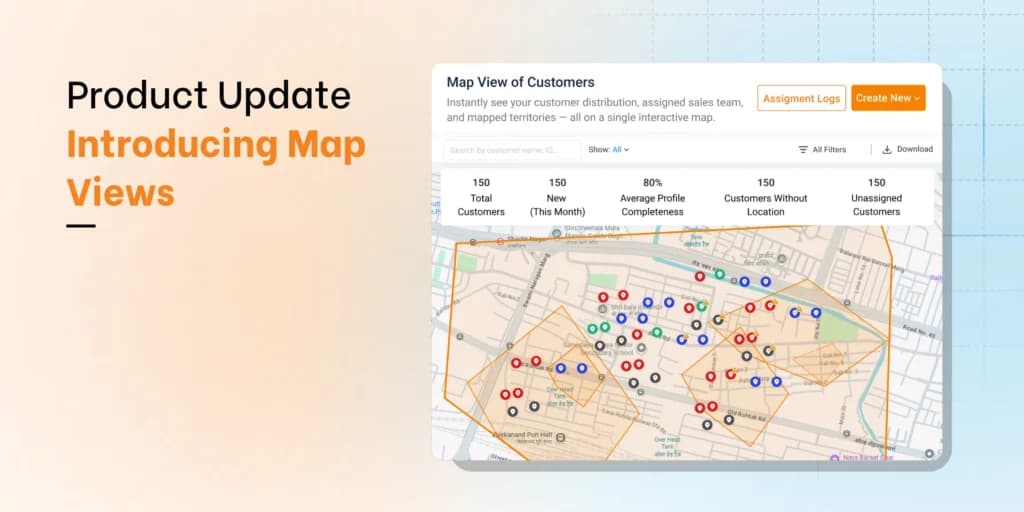
In BeatRoute, Map Views plot your outlets or distributors, with a heat map showing where shops cluster. A filter picks out shops no rep has been given yet.
How to map a sales territory, from pins to beats
- Write down what is broken. Shops nobody visits, or targets one rep can never reach? Name it before you draw, because the new map has to fix it.
- Pin each outlet at the counter. A kiosk's address is often a landmark, such as the shop behind the bus park. The pin a rep drops while standing in the shop is the one to trust.
- Use boundaries people already know. Counties and wards in Kenya, local government areas in Nigeria, districts elsewhere, rather than postal codes few reps could name. Any new outlet then has a territory from its first day.
- Give each outlet a weight. Grade it A, B or C, decide how often it needs a call, and note its potential. A busy supermarket visited weekly takes more time than the kiosk beside it visited monthly. That is why city territories look small on the map and rural ones look big. Each should carry roughly the same hours.
- Balance on hours, then fix it by hand. Let the tool split first. Then correct it where a river, a highway or a market day fools it. A packed market street can take less time than a few shops strung along a trunk road.
- Match each territory to its distributor. If a territory crosses into another distributor's area, orders go to the wrong partner and stock disputes follow.
- Cut territories into beats and routes. Split each territory into beats (the outlets a rep visits on the same day each cycle), then let route optimization set the order of stops.
Check coverage before you redraw or hire
Score each territory on customer connect: of all the outlets given to it, how many get a rep's visit. Sales tell you what moved. Customer connect tells you whether anyone can actually work that patch. Good sales with weak connect means a territory riding on a few big buyers while its kiosks and dukas wait.
So when a territory looks thin, fix the map and the beats before you add a rep. Valvoline Cummins lifted customer connect from 25–30% to 70%+ on BeatRoute. Read the Valvoline Cummins case study.
Watch for the beat no one completes. Once reps cannot finish, they start dropping stops, and the far shops go first. Two other moments call for a review: a rep leaves, or a distributor is replaced.
BeatRoute's Workzones draw the area by geography and hang distributors on it. Swapping a distributor then changes one link while the boundaries stay put (our explainer on what a sales territory is covers streets that several distributors share). After any change, run the unassigned-outlet filter to find any shop left without a territory.
Five kinds of tool sold as territory mapping software
| Type of tool | What it does, and for whom | The catch |
|---|---|---|
| Stand-alone territory design tools | Load a spreadsheet of accounts, then draw areas yourself or have the tool even them out. Good for planners who rework a few hundred accounts once or twice a year. | Beats and orders live elsewhere, so every change gets retyped. |
| CRM add-ons | Show the CRM's accounts on a map and write the territory onto each record. Good for B2B teams that run their deals in the CRM. | Not much for distributors or regular calls on small shops. |
| Route and visit apps | Put a rep's stops on a phone map and order the day. Good for small teams that sell direct. | Thin on territory design. No distributors, no orders. |
| Field sales and distribution platforms | Territories, beats and routes planned in the system that books orders, records visits and manages distributors. Good for retail brands whose reps cover hundreds of dukas, kiosks and stockists on a set cycle. | Heavier setup than a small direct team needs. |
| GIS tools | Deep spatial analysis with population layers and custom boundaries. Good for analysts on one-off market studies. | Slow for everyday selling. Needs trained specialists. |
Ask one question first: will reps work from this map every morning, or will it only fill a slide at the sales conference? A slide needs a design tool or a CRM add-on. A daily plan for reps who sell through distributors needs a field sales platform.
Then look at how you sell. A small team calling on a few hundred accounts can get by with Excel, a free online map, a design tool or a CRM add-on. A team serving thousands of dukas, chemists and kiosks on a weekly beat, stocked by distributors and vans, cannot. For a side-by-side of named products, see our territory management software comparison.
Test it on your own outlet file
Demos look good on clean sample data. Give each vendor one region's real outlet list, messy rows included, and run these checks.
| Check | What to do in the demo |
|---|---|
| Outlet pins | Count the shops that land in the wrong place. Landmark addresses catch weak tools out fast. |
| Balancing | Balance on sales value, call frequency and visit time together, then change one weight and watch what moves. A count of outlets alone misleads. |
| Travel time | Set the tool's estimate for one real beat against the time your rep actually takes, traffic and bad roads included. |
| Distributor areas | Draw a territory over one distributor's area. Outlets, orders and stock should all follow it. |
| Rep app with no signal | Put the phone in flight mode and finish a visit. |
| Orders and visits by territory | Ask for last month's orders and missed visits, territory by territory. |
Run the tool you pick in a single region for two full beat cycles or more. Then set visits completed and the number of shops placing orders beside your starting numbers.
If your reps sell through distributors
BeatRoute suits brands whose reps sell to many retailers through distributors and want distributor management on the same platform. Beat planning, route optimization and visit planning turn each territory into a rep's week. Because orders and visits sit in one system, a weak patch shows in this week's customer connect figures rather than at month-end. AAVA Brands in Nigeria grew store-level sellouts 25–30% running its field sales and distribution on BeatRoute (AAVA Brands case study).
To see your own territories on the map, request a demo and bring the outlet list for one county, state or city.
Frequently asked questions
What is territory planning software?
Territory planning software does the same job, sometimes without a map: grouping outlets, sizing each territory's workload and naming its owner. A territory mapping tool adds the map, so you see each territory's shape change as you move outlets.
Is territory mapping the same as route planning?
No. Territory mapping settles which rep and which distributor own which outlets. Route planning sets the order of stops on one day. Fix the territory first, because no route can rescue a territory with too much work in it.
Can a territory mapping tool connect to our ERP or CRM?
Ask whether outlets sync from your ERP or CRM or arrive by file upload. Then, in the demo, add a test outlet in your invoicing system and time how long it takes to appear on the map.
How much does sales territory mapping software cost?
Pricing is usually a subscription, charged by user or by module. BeatRoute is subscription software, priced per user and module on annual contracts, with no free trial.